There are two things people mean when they say they miss the iPod. One is the object: the wheel under the thumb, the click, the green-grey LCD. The other is the way of listening: a library you owned, browsed by menu, with no feed, no ads and no signal required. A good iPod-style player for iPhone has to deliver both.
The wheel has to be a wheel
A ring with four icons drawn on it is a picture. A wheel is something you run your thumb around: the list scrolls with your finger, it clicks as it passes each item, and it keeps momentum when you let go. On MP95's Classic Wheel the ring scrolls the list and scrubs the track, with haptics on every step. The four points of the ring are menu, previous, next and play/pause; the centre selects. Hold the centre to love a track.
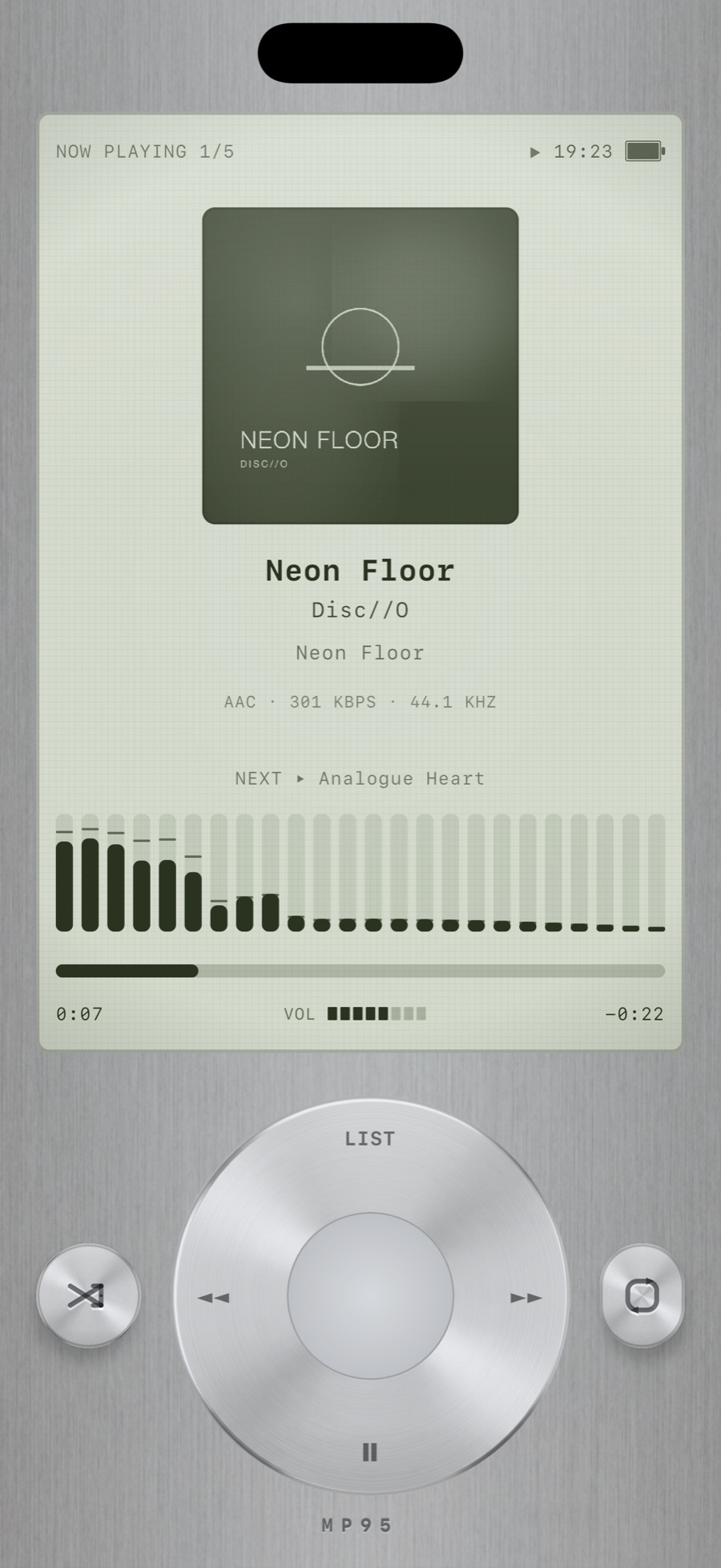
This is an original design. It has the feel of the pocket players of the 2000s without copying one, and MP95 is not affiliated with Apple.
Menus, not a search box
The pocket players were browsed one list at a time: Songs, Albums, Artists. That constraint is half the pleasure. MP95's wheel player has its own menu-driven library with Songs, Albums, Artists, Folders, Lists, Loved and Recent, and the wheel does the scrolling. Search is there when you need it, but you can go a whole evening without touching it.
An LCD that tells you things
The display shows album art, the track, artist and album, the format and bitrate of the file (so you know when it is FLAC), what plays next, a bar equalizer that reacts to the music, and a heart when the track is loved. It is drawn as a backlit LCD, greenish, with the faint grid of the panel visible, because that is what the thing looked like.
Owning the music, again
The other half of the iPod was that the music was yours and on the device. MP95 has no network access: no account, no ads, no streaming. You add a folder from the Files app and it is read in place, import songs you own from the Music library, or drop files in from a Mac. MP3, FLAC, ALAC, AAC, WAV, AIFF and CAF. It works on a plane and in a basement. See how to add music files to an iPhone.
The wheel on your home screen and your wrist
The click-wheel widget puts the wheel on the home screen: the left, right and bottom zones of the ring are previous, next and play/pause, the elapsed time is a live system timer, and the menu and centre open the app. On Apple Watch, the same wheel is the remote for the phone. Read about widgets and the watch remote.
And it sounds better than the original
The wheel player runs the same sound desk as the other machines: a five-band EQ, presets, volume boost, stereo width, slowed + reverb and 8D. Or nothing at all, with the analog switch off, in which case a FLAC plays bit-for-bit, which is more than the old players could say.
Getting it
MP95 is free on the App Store with the cassette deck and turntable; the Classic Wheel plays for a free preview at any time and is part of MP95 Pro. See the Classic Wheel.
Frequently asked questions
Is there an official iPod app for iPhone?
No. Apple discontinued the iPod in 2022 and has not released a click-wheel app. MP95 is an independent app with an original click-wheel design.
Can an iPod-style app play my Apple Music library?
It can import songs you have purchased and that are downloaded on the device. Streaming-only tracks cannot be played by third-party apps.
Does the wheel scroll with my thumb?
Yes. The ring scrolls lists and scrubs the track, with haptic clicks.