The cassette is the most searched-for retro player for a reason. It is the format most of us actually held: we wrote on the labels, wound the tape back with a pencil, watched the hubs turn through the little window. A cassette player app is a promise to bring that back, and most break the promise the moment you press play and nothing moves.
This guide is about the difference between a cassette-shaped skin and a cassette deck that behaves like one. We build MP95, so we will use it as the example, and we will be specific about what it does and does not do.
1. The reels have to move like reels
On a real deck the take-up hub gains tape as the track plays and the supply hub loses it. Because the tape runs at a constant linear speed, the hub with less tape on it turns faster. If an app spins both hubs at the same constant speed, your eye notices within seconds, even if you cannot say why.
MP95 draws the tape pack as a photograph of a real wound reel, clipped to the current radius rather than redrawn as rings, and turns each hub at a rate proportional to one over that radius. Press play and the motor spins up over about a tenth of a second; press pause and it coasts to a stop. Scrub the track and the pack winds forward or back with the same physics.
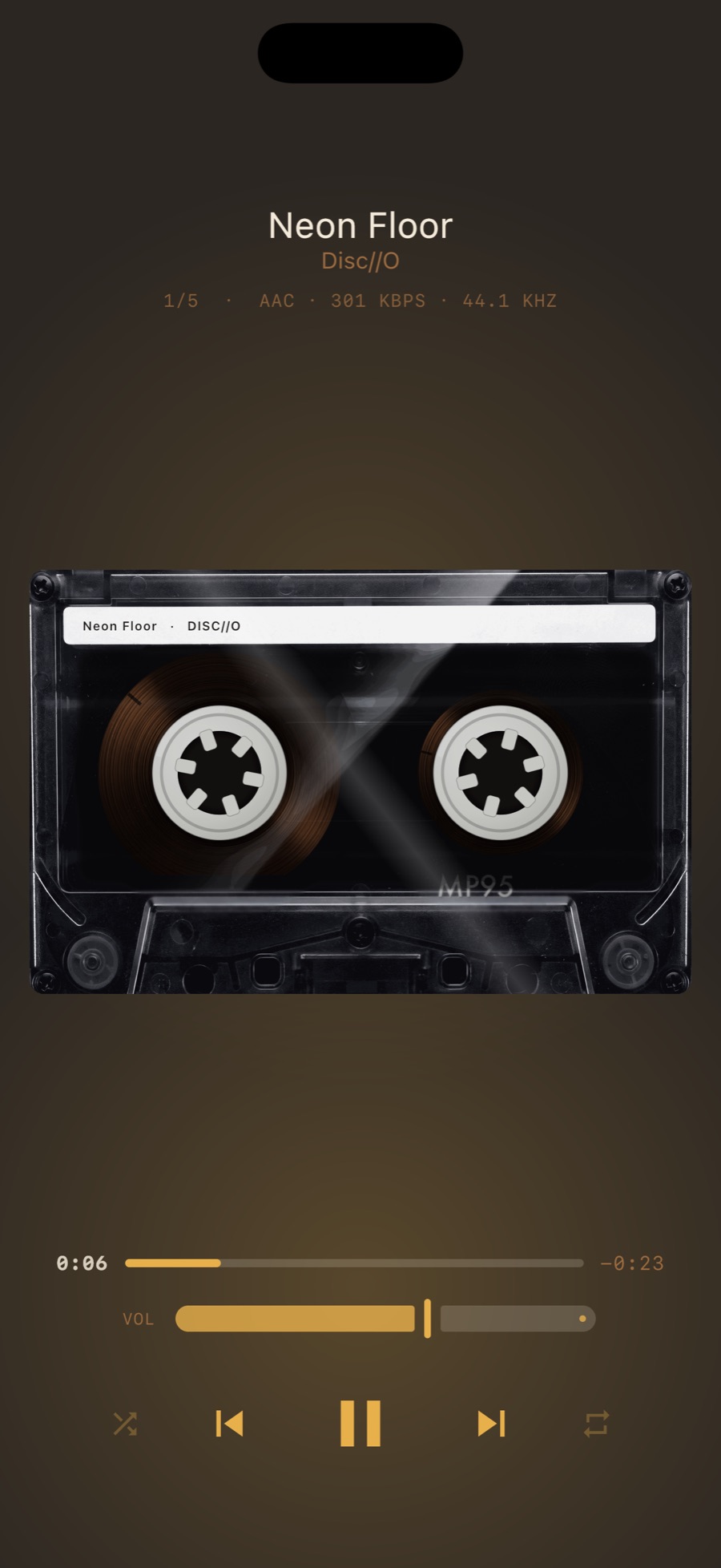
2. The label should say what is playing
A blank cassette is a stock photo. A cassette with your track name and artist printed on the label is your tape. MP95 prints the label on every song, in a typeface that reads like a J-card, and on the narrower shells it fits both on one line so nothing wraps off the strip.
3. It should sound like tape, and you should be able to switch that off
This is where most apps stop. Cassette sound is not an EQ curve. It is saturation (the soft compression and harmonics of tape pushed slightly hot), wow and flutter (slow and fast pitch movement from an imperfect transport), and a low noise floor. Together they make sustained notes feel alive and take a hard digital edge off the top.
MP95 renders all three in a native real-time chain when the cassette deck is selected. The preset is deliberately mild: a few dB of drive, gentle flutter, a whisper of hiss. It is a good deck, not a worn Walkman. If you want the file untouched, one switch bypasses the chain, and the setting is remembered per machine. We wrote a longer piece on what wow and flutter actually are.
4. It must play your own files, offline
A cassette was the format of owning music. A cassette player app that only works with a streaming subscription misses the point, and in practice no third-party app can play Apple Music or Spotify catalogues anyway. Look for an app that plays local files: MP3 and AAC at minimum, and FLAC, ALAC, WAV and AIFF if you have a lossless collection.
MP95 plays all of those from a folder you add in the Files app (read in place, never copied), from songs you own in the Music library, or from files you drop into the app folder from a Mac. It has no network access, so it cannot upload anything and cannot break without signal. See how to add music files to an iPhone.
5. More than one cassette
Once the mechanism is right, the shell is the fun part. MP95 ships a stock black cassette free and five more with Pro: NOIR (smoked black with a single diagonal highlight), AMBER (the orange transparent tape of the eighties), CHROME (silver with red and black stripes), GOLD (black with gold print), BLUE (cream with a blue band) and NEON (clear, with the tape visible from edge to edge). Each is photographed from above and cut into two layers, the cavity behind the window and the plastic in front, so the tape turns behind the glass rather than being painted on top of it. Swipe the cassette to change it.
Turn the phone sideways and the cassette fills the whole screen; the transport keys fade after a few seconds. Tilt the phone and the highlight slides across the plastic. More on the six shells.
6. What else the deck should give you
- A visualizer behind it. MP95's FX chip puts bars, a waveform, an aurora, a stream, a pulse or RGB behind the deck. See the visualizer.
- A library that treats albums as objects. Sleeves, cases and boxes rather than a list, with search in every tab.
- Widgets. The deck on your home screen with its keys, and a live playhead.
- A remote. On Apple Watch, a cassette-styled remote for play, pause, skip and love.
- A Mac version. The same deck full-window, with the six shells, on the Mac.
The checklist
| Look for | Why it matters | MP95 |
|---|---|---|
| Reels that follow tape physics | Constant-speed hubs look fake | Yes: speed ∝ 1/radius, motor inertia |
| Label prints the track | It is your tape, not a stock photo | Yes |
| Real tape sound, switchable | Saturation, flutter, hiss; bypass when you want | Yes, native DSP, one switch |
| Plays your files offline | No subscription, no network | Yes: MP3, FLAC, ALAC, AAC, WAV, AIFF, CAF |
| More than one shell | The fun part | Six |
| Free | You should not pay to find out | Cassette deck free forever |
MP95's cassette deck is free with your whole library. Read about the deck or get it from the App Store.
Frequently asked questions
Is there a free cassette player app for iPhone?
Yes. MP95's cassette deck is free forever, including your whole library, offline playback and the stock cassette shell.
Can a cassette player app play Spotify?
No. Streaming catalogues cannot be played by third-party apps. Cassette player apps play the music files you own.
Does MP95 sound like a real cassette?
It runs a real-time chain with tape saturation, wow and flutter and hiss, tuned gently. You can switch it off.