The short answer
MP3 128 kbps has a tighter data budget and can reveal compression artefacts, especially on demanding passages. MP3 320 kbps gives the encoder more room and can be difficult to distinguish from the lossless source. Neither result is guaranteed for every recording, encoder or listener.
FLAC preserves the PCM audio supplied to its encoder. It is a reliable format for retaining a lossless source, even when you cannot hear a difference in a particular comparison. That is a preservation advantage, not proof that every FLAC file will sound better than every MP3.
Bitrate, file size and format are different things
Bitrate measures data per second. Sample rate measures samples per second; bit depth describes sample precision. A 320 kbps MP3 is not “320 kHz” or “320-bit” audio.
| File | Data rate | Three-minute example | What it preserves |
|---|---|---|---|
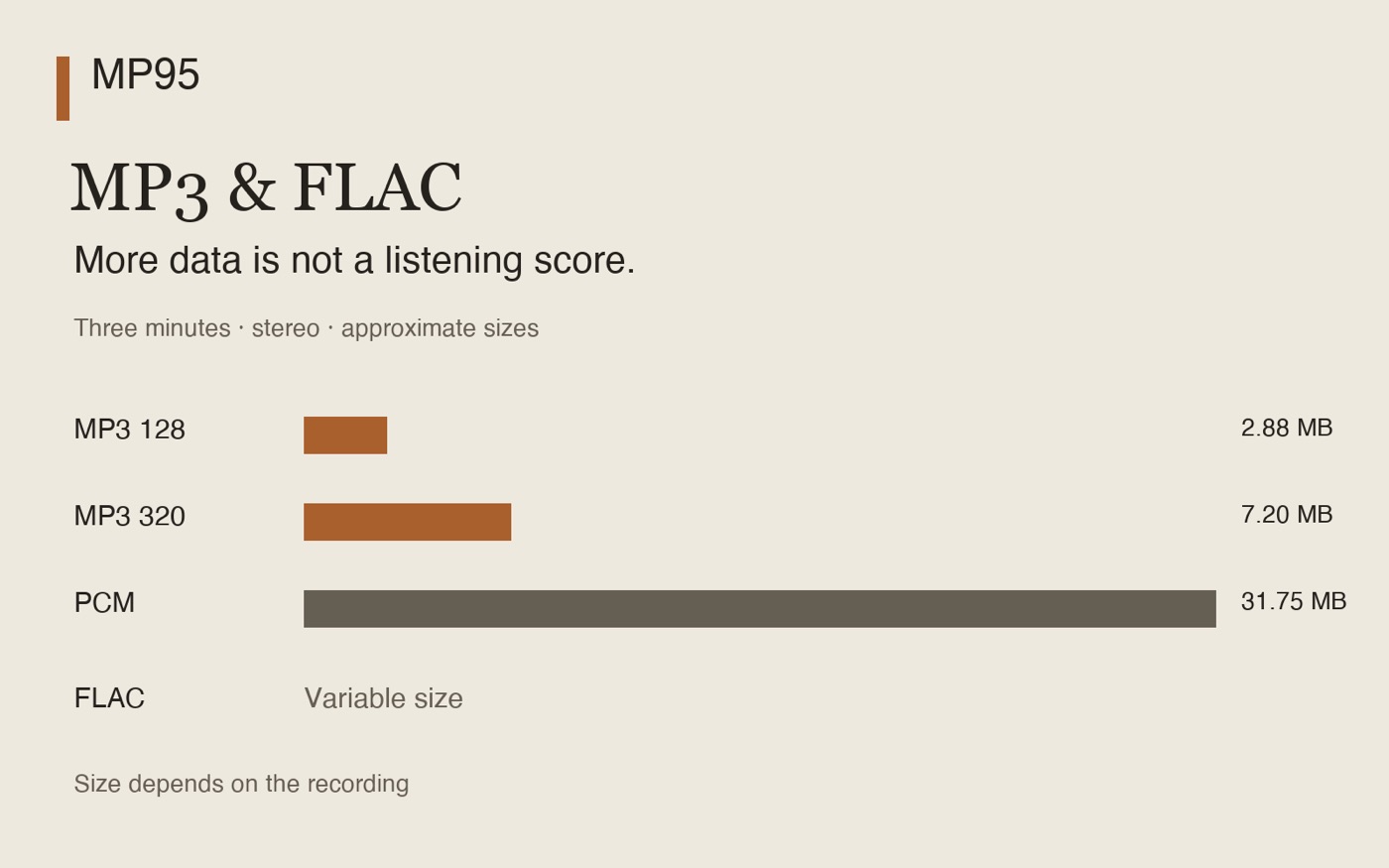
| MP3 128 | 128 kbps CBR | 2.88 MB | Lossy encoding |
| MP3 320 | 320 kbps CBR | 7.20 MB | Lossy encoding |
| FLAC | Variable | Depends on the audio | The encoder’s PCM input, losslessly |
| Uncompressed PCM | 1,411.2 kbps | 31.75 MB | 16-bit / 44.1 kHz stereo in this example |
The sizes use decimal megabytes and exclude tags, cover art and container overhead. MP3 values assume constant bitrate; variable-bitrate MP3 sizes differ. FLAC has no single fixed bitrate: the recording and compression settings affect its size. The official FLAC FAQ explains why a compression setting is not a sound-quality setting.
What compression artefacts can sound like
Listen for a watery or metallic texture on cymbals, a blurred attack on percussion, or unstable ambience around a voice. These are possible clues, not defects you should expect in every 128 kbps file. Test short passages you know well rather than trying to judge an entire album from memory.
A modern encode and an old, repeatedly converted file can share the same displayed bitrate and sound different. Comparing two downloads with different mastering also tests the mastering, not just the codec. A spectrogram can reveal differences, but a visible difference is not automatically an audible one.
MP3 is a perceptual codec. Fraunhofer’s MP3 overview describes the technology; its broader MP3 and AAC paper explains the coding approach. Do not apply an MP3 bitrate conclusion directly to AAC or another codec.
A fair way to test your own hearing
- Start with one lossless recording you are entitled to use. Create the comparison MP3 files from that same source with a known encoder. Do not convert an existing MP3 to make a supposed lossless reference.
- Use the same player, output device and comfortable volume. Match playback levels; disable EQ, loudness processing, analog effects and crossfade for this comparison.
- Compare short, aligned excerpts. Hide the labels or ask someone else to randomise them.
- Use an ABX comparator if available: A and B are the references, and X is secretly one of them. Your task is to identify X, not guess which label should sound better.
- Keep the results from all trials. Decide the trial count before starting; do not keep restarting until you get a flattering result.
The foobar2000 ABX Comparator is one available tool; check its current platform requirements. Professional assessment uses controlled methods such as ITU-R BS.1116. A home ABX session is not a laboratory certification.
A few correct guesses can happen by chance. A repeatable result applies to the files, passage, equipment and conditions you tested. Failing to distinguish them in that test does not prove that nobody could hear a difference elsewhere.
Headphones, Bluetooth and the room
Background noise, playback level, headphones, speakers and room acoustics can change what is noticeable. An expensive DAC does not guarantee that you will identify a codec. Bluetooth may introduce another encoding stage; the file’s FLAC label does not describe the whole wireless route.
If you want to isolate the file codec, keep the output route unchanged. A suitable wired route removes the Bluetooth stage from that particular comparison. For wireless listening, see FLAC and AirPods.
Which file should you keep?
Keep FLAC when you want to preserve a genuine lossless source and make future listening copies without another lossy generation. Choose a well-encoded MP3 when storage or compatibility matters. MP3 320 uses 2.5 times the audio data of MP3 128 CBR; it does not deliver “2.5 times the sound quality”.
If you already enjoy an MP3 library, replacing every file is not automatically necessary. Start with recordings where you notice a problem. Converting MP3 128 to MP3 320, or MP3 to FLAC, cannot restore discarded audio information.
Listen to your files in MP95
MP95 plays FLAC and MP3 on iPhone, iPad, Android and Mac. Keep both formats in one offline library, check the file information, and choose a cassette deck, turntable or another retro interface for everyday listening.
For a format comparison, turn off optional effects and use the same output settings. MP95 is not an ABX test tool and cannot recover detail removed by an MP3 encoder. When you have chosen your files, its retro players and free tag editor make them easy to keep and enjoy. Find permitted downloads in our free FLAC and MP3 guide.
Frequently asked questions
Is MP3 320 always audibly better than MP3 128?
No universal result applies to every file and listener. With the same source and encoder, 320 kbps gives more data for coding, but audibility depends on the passage and listening conditions. Compare matching files without seeing the labels.
Can a person hear FLAC versus MP3 320?
Some comparisons can be distinguishable, while others can be difficult. A controlled blind test of the same source is more useful than a claim that everyone, or nobody, can hear it.
Does FLAC compression level change the sound?
No. Correctly encoded FLAC retains the same PCM input at different compression levels. The settings affect encoding effort and file size, not a lossy audio-quality scale.
Will converting MP3 to FLAC improve it?
No. The FLAC can preserve the decoded MP3 audio, but it cannot recreate information discarded during MP3 encoding.